

Turn Forms Into Automated Workflows
Design dynamic forms, streamline operations, and eliminate repetitive manual tasks — all without code.
Talk to Our ExpertsBuild Smarter Forms Faster
Create no-code forms inside Salesforce and automate data collection, approvals, and workflows without complexity.
Get StartedSimplify Your Form Workflows
Replace manual processes with intelligent forms that capture, route, and manage data seamlessly in Salesforce.
Book a DemoFor schools, duplicate student records can create more than a messy database. They can affect admissions, financial aid, enrollment, advising, and reporting when different departments work from different versions of the same student information.
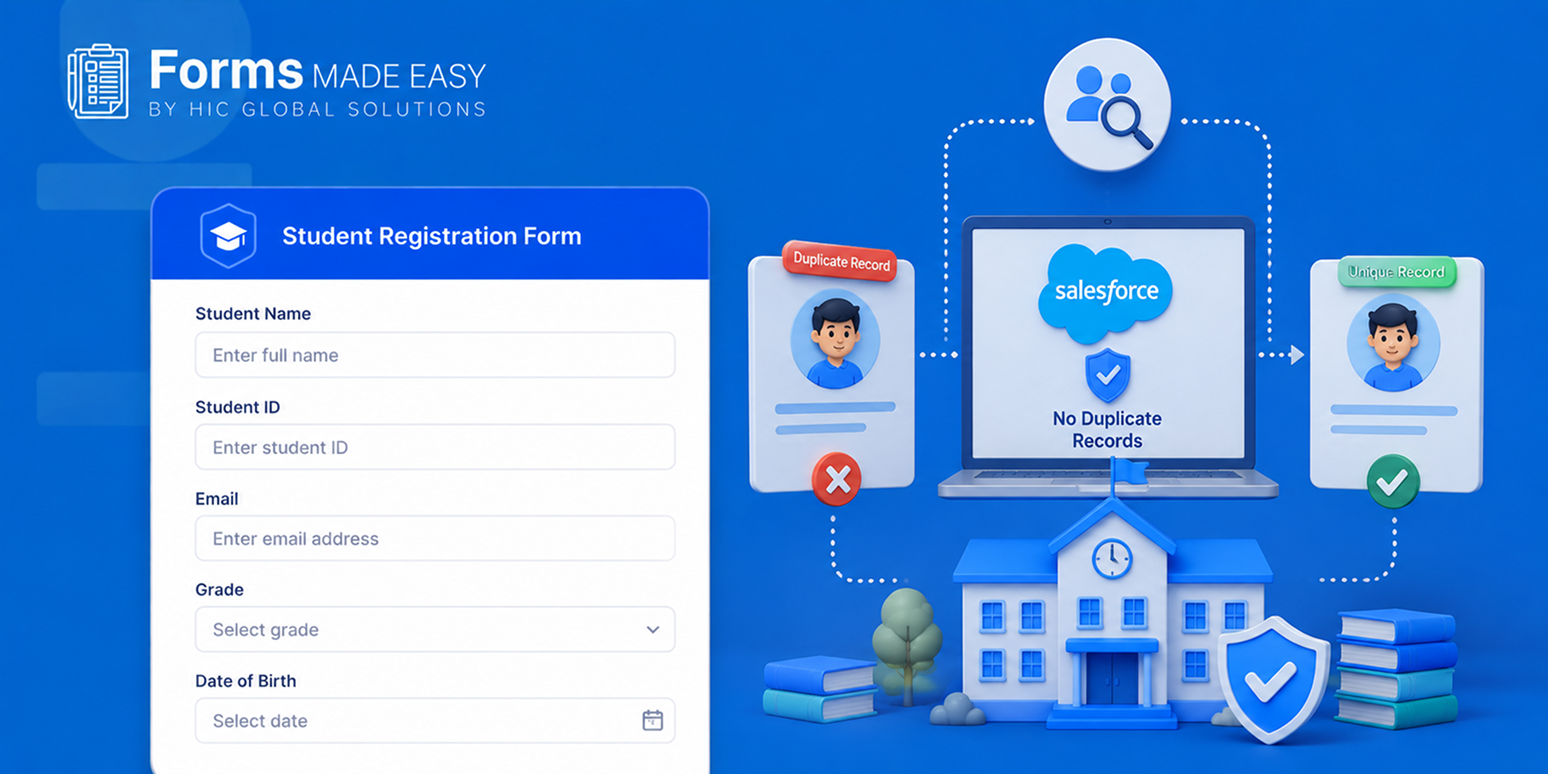
The problem often starts with something simple: a student submits information through multiple applications, events, inquiries, or registration forms using slightly different details. Salesforce forms can help schools identify existing records before creating another one.
In this blog, we will look at practical ways schools can prevent duplicate student records, from validation and matching rules to smarter lookups and upsert logic. We will also explore how dynamic forms Salesforce workflows can support accurate data.
Schools can prevent duplicate student records in Salesforce by using form validation, lookup logic, Matching Rules, Duplicate Rules, and Smart Upsert. These controls help identify existing students before a new record is created.
5 Ways to Prevent Duplicate Student Records Before They Reach Salesforce
1. Design Forms With Strong Input Validation
Preventing duplicates starts before the record is created. A form should collect the information Salesforce actually needs to recognize a student, instead of allowing every field to be entered in whatever format the user prefers.
For example, schools can make Email Address and Last Name required, validate phone numbers, and use structured fields for State, Grade Level, Program, or Intended Major. This creates cleaner information for matching later.
- Require key identifiers such as email and last name
- Standardize phone number formats
- Use picklists instead of open text where possible
- Apply consistent email validation
- Avoid collecting multiple fields that represent the same information differently
2. Check Salesforce Before Creating a New Record
A form should not blindly create a new Contact or Lead every time someone clicks Submit. It should first check whether that person already exists in Salesforce.
With a Salesforce form builder connected to lookup logic, the submission can first search Salesforce using an identifier such as an email address or external student ID. The result then decides what happens next.
If a matching student exists, the submission can update that record. If there is no match, Salesforce can create a new record. This simple check can stop a large number of duplicates before they even reach the database.
3. Use Smart Upsert Logic Instead of Simple Record Creation
There is an important difference between creating a record and upserting a record. Create always means, “make another one.” Upsert means, “check first, then decide what needs to happen.”
A properly configured form can use an existing identifier to determine whether the submission belongs to an existing student. If it does, the existing record can be updated; if not, Salesforce can create a new record.
For schools using Salesforce for education, this approach can help keep student information connected across different forms and interactions instead of creating a new record for every submission.
4. Configure Salesforce Matching Rules and Duplicate Rules
Form-level checks are useful, but they should not be the only protection. Salesforce provides Matching Rules to determine how potential duplicates are identified and Duplicate Rules to decide what happens when a match is found.
Schools can create matching logic around combinations such as name, email, phone, address, or other relevant student identifiers. Salesforce also supports custom matching rules when the standard logic does not fit the organization’s requirements.
Salesforce matching rules can be configured around combinations such as:
- First Name + Last Name + Date of Birth
- Email + Last Name
- External Student ID
- Other institution-specific identifiers
One important detail here, duplicate rules should be designed around the actual data and process. A rule that looks good on paper but depends on fields users cannot access, for example, may not work as expected.
5. Use Consistent Fields Instead of Free-Text Everywhere
A student may enter “California,” “CA,” or “Calif.” in three different submissions. To a person, these might obviously mean the same thing. To a system, well, things can get a little messy.
Using structured values wherever possible gives Salesforce more consistent information to compare. This is why fields such as State, Program, Grade Level, Student Type, and other controlled values should generally use picklists or predefined options.
For a form builder Salesforce setup, this also makes the form easier to maintain because administrators are not cleaning different versions of the same value later.
Prevent Duplicate Student Records With Forms Made Easy
The form itself can play a much bigger role in data quality than many schools realize. Instead of treating it as just a page where someone enters information, a Salesforce form can become the first layer of data validation, lookup, and duplicate prevention.
Forms Made Easy is a Salesforce-native form creation tool designed to help teams build forms directly around their Salesforce data and processes. It also brings capabilities that can help schools collect cleaner information and handle submissions more intelligently.
AI Form Template Creation
Create form templates using AI by describing what information the form needs to collect. This can help teams get a working form structure without manually building every field from scratch.
AI Form Rule Creation
Create form rules with AI to define how fields and form behavior should work. This can be useful when schools need conditional logic and validation without building everything manually.
Templates Library
Start with ready-to-use templates instead of creating every education form from an empty screen. Teams can adapt templates around admissions, inquiries, registrations, applications, and other workflows.
Real-Time Data Sync
Keep submitted information connected with Salesforce records in real time, so the data does not have to sit separately and wait for someone to move it into Salesforce later.
Spam & Bot Protection (CAPTCHA)
Protect public-facing forms from spam and automated submissions with CAPTCHA protection, helping keep unnecessary submissions away from the Salesforce database.
Payment Collection
Collect payments through forms when a process requires fees, registrations, applications, or other transactions, while keeping the submission process connected with Salesforce.
Unlimited Form Creation
Create as many forms as different teams and processes require, without having to maintain a completely separate form system for every department.
Smart Upsert (Duplicate Prevention)
Use Smart Upsert to check existing Salesforce data before creating another record. When a matching record is found, the submission can be handled against the existing record instead of simply creating another one.
This is particularly useful when schools have students interacting through several forms over time. A single student may submit an inquiry, apply for a program, register for an event, and later update their information, and all those interactions should not become four different student records.
Conclusion
Duplicate student records are much easier to prevent when the form catches potential matches before they become another record sitting in Salesforce.
Schools can combine required fields, validation, lookup logic, matching rules, duplicate rules, and upsert processes to create a much stronger data-quality workflow.
And this does not have to become another complicated technology project. A no-code form builder such as Forms Made Easy can give Salesforce teams the tools to build smarter forms while keeping duplicate prevention closer to the point of submission.
If your school wants to create Salesforce forms and keep student data cleaner from the beginning, install Forms Made Easy from Salesforce AppExchange and start building directly inside Salesforce.